


The AIEP Generator at aiep.lovable.app is a free tool that walks you through a short design flow and produces two things: a draft AI-enhanced process and a detailed prompt you can drop straight into a bot like SchoolAI, Flint, Magic School, a custom GPT, Poe.com, or your prefered AI bot creation platform that you use at your school.
The Generator collects a few types of input. First, the thinking moves you want to center; the verbs that matter in your classroom. Second, your class context; subject, task type, grade level, and where you are in a unit. Third, your learners; cultural context, language needs, scaffolding considerations, anything that shapes how your students engage. Fourth, the ways students can make their thinking visible through documentation or what is referred to as “breadcrumbs” (i.e. trails of thinking).

The site was vibecoded with Lovable.dev and iterated upon over the last couple years. It runs on DeepSeek by taking your input and sending it via what’s known as an
”API call” and returns a custom process and is completely free to you (I pay for each API a fraction of a penny). It takes about ten minutes to create a process. You might think of it as scaffolding to get you to where you want to be with process creation.
It’s important to note that this is a sketchpad, not a finished process you can copy and paste into your classes. This tool gives you a reasonable draft and gets you and your students started. You, the wise user of AI, still bring the judgment. That part does not get outsourced. So please practice Think, Generate, Edit whenver using it. Think by considering who your learners are, what you want to accomplish, and other important details. Generate by following the website’s prompts. Edit by judging the output, editing your notes, and regenerating until it’s precisely what you and your learners need.
How to Use It
Name your thinking moves, AI’s role, and Where AI is Placed
The generator asks you to identify the type of thinking you want students to practice. This is the heart of an AI-enhanced process; you have to name the thinking before you can design around it. Consider being specific about AI’s role and where it should appear within your process. Do you want a coach-like AI that is used at the beginning of the process? Those are design decisions that you can play with; don’t worry if it doesn’t turn out the way you had planned, you can try different options and regenerate the process at any time.
Add your class context.
Tell the tool what you are actually teaching. The task, the subject, the grade, where you are in the unit. This is what makes the output useful instead of generic. “High school English, argument essay, mid-unit revision” produces something very different from “middle school science, claims and evidence.” The more concrete you are here, the more helpful the generated process becomes.
Add whatever shapes how your students engage: home languages, prior knowledge gaps, cultural contexts that matter for the task, scaffolding needs. The generator uses this to make the process fit your actual humans, not a hypothetical class of compliant, monolingual, grade-level readers.
Generate.
The tool produces mostly three-verb processes that should be thought of as a first draft and iterated upon. No AI will get precisely what you and your learners need the first time. It will also produce a detailed prompt built around your inputs that you can feed into a bot so that it support learning precisely the way you want within a process. Both the process and the prompt are yours to use, modify, and run.
Didn’t get what you want? Regenerate!
The site was designed as a single page intentionally to help users create processes by refining their prompts and tweaking their results until it matches their needs.
Download as a Word File and Build AI Bots.
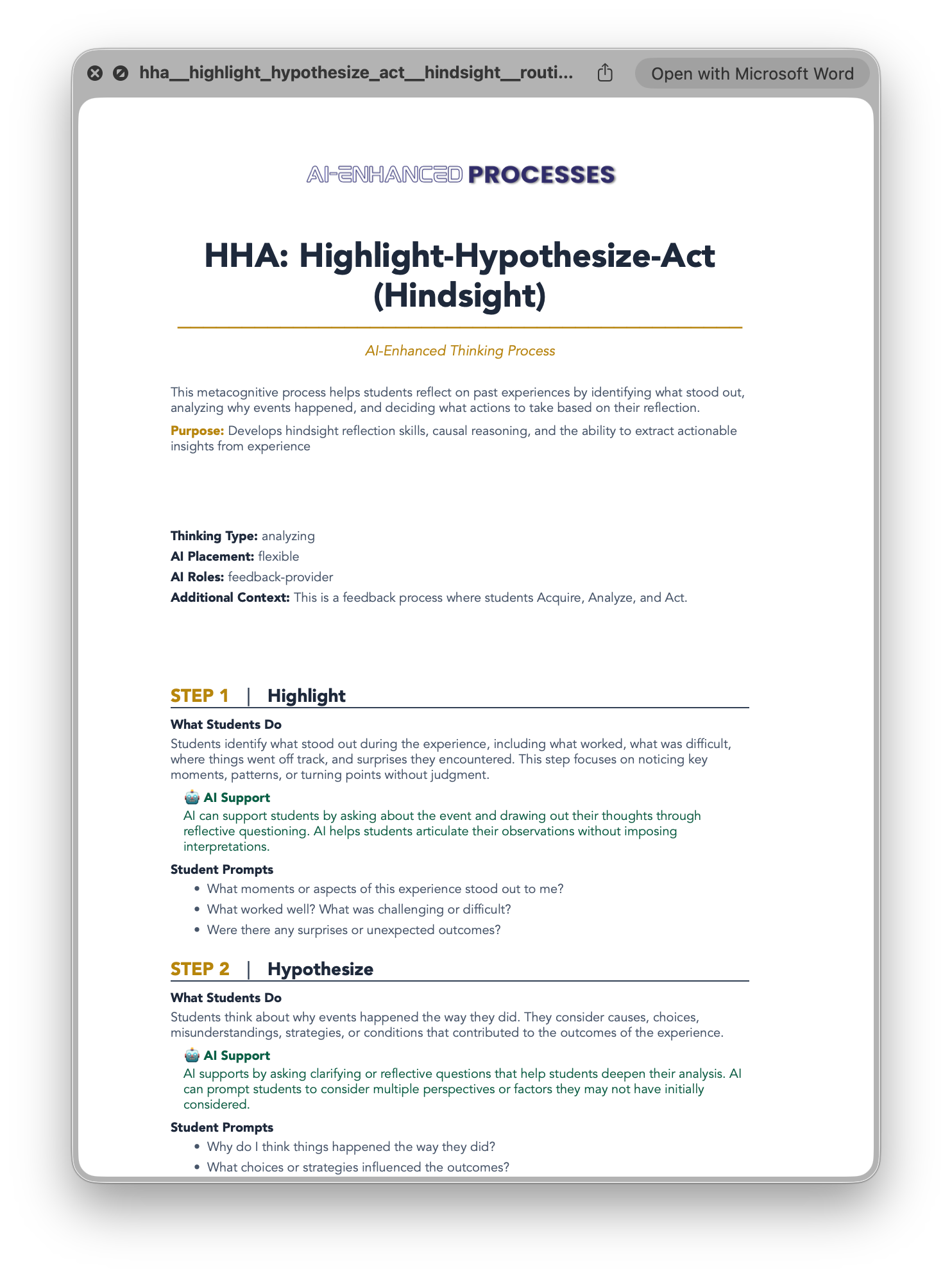
You’ll notice that after you generate, at the bottom of the page is a download button that gives you access to a Word file with all your details, learning objectives, the process, and a prompt you can put into your school’s AI platform (e.g. Flint, Magic School, SchoolAI, etc.) The bot will know precisely its role within your process and your learning objectives. Below is a preview of the output you’ll get from the Generator.
Teachers: Taking the Prompt Into Your Classroom
The generated prompt is designed to drop directly into a purpose-built bot. Paste it into SchoolAI, Flint, Magic School, or whatever platform your school uses. Once it is loaded, the bot knows your process; it can coach to it rather than around it.
Here is what that looks like in practice. Say your thinking move is brainstorming and you want students to generate their own ideas before AI enters the room. The prompt tells the bot to ask Socratic questions that push student thinking; it will not generate ideas for them. Students have to bring something first. The bot responds to what they bring. That is the guest collaborator framing in action: you set the invitation terms before the guest arrives, and the guest respects the boundaries of the process.
Students: Designing Your Own Process
If you’re a teacher and you’re reading this, feel free to share the site with your students when thare are ready to take charge of their own process design. What we ultimately want to see is that students show a level of independence and self-directedness in their learning. Afterall, as adults, they probably will not have someone creating scaffolded learning experiences to support the meaningful use of AI to support and not replace thinking. It is therefore arguable that somewhere in secondary school and university that students will likely be ready for increasing amounts of independence in their thought processes that leverage AI.
Please feel free to encourage students to intentionally consider when and how they use AI in their work. Asking them to use this site is one way that they might consider their thinking moves with your gradually released support, feedback, and coaching.
What It Does Not Do
The tool does not know your school’s AI policy.
It does not know which platforms are approved, what your administration has communicated to families, or what your district’s guidelines say. It also does not know your values or how you express them through actions. That context is yours to bring, so please share it in the appropriate fields when generating your process to make the output contextualized for your students. That being said, this tool is more for thought process generation and will incorporate additional details where possible. The school’s culture, values, policies, etc. are likely going to appear around how this process is implemented.
It will not know your students the way you do.
The draft will be a starting point, not a finished design. The first version will probably be a little messy. That is fine. Messy first drafts are how good processes get built; you run it, notice what doesn’t quite work, and iterate. Remember, nobody is an expert on AI and you should give yourself permission as a lifelong learner to experiment.
Do not expect automaticity on the first run.
Students need to practice a process repeatedly before it becomes internalized; a new and novel AI-enhanced routine does not become second nature after one practice. Plan to run it, reflect on it, and revise it with them! Ask your students for feedback: how could we make this process even better next time? The tool makes the first draft fast. The repeated practice is still your role as a teacher to implement in class repeatedly. Think of it as a strategy on how we use AI effectively to support our thinking; it’s a strategy that takes practice. In that way, the process could be displayed in the room on the walls to remind everyone of the strategies that can be leveraged when needed. A few, high impact strategies that are practiced throughout the year is a great approach.
Invitation
Want to give it a try? Make your own process! Help students make their own! Let’s share your story. Reach out to me via the “About” page or LinkedIn and let’s share your story about the process used to support student learning.
Not sure where to start? You do not need to redesign your entire curriculum. Pick one task you teach repeatedly; brainstorming, outlining, peer feedback, revision, reflection. Something you already have momentum with. That is your best candidate.
Go to aiep.lovable.app and follow the steps. Take the output, tweak it until it sounds like your classroom, and run it once this week.
Planning a process used to mean starting from nothing. Now it means starting from a reasonable draft and making it yours. That is not outsourcing the thinking. It is protecting time for the thinking that actually matters; the judgment calls, the coaching moves, the relationships that no synthetic guest can replicate.
Name the thinking. Set the expectations. Make the learning visible. The tool helps you get there faster.
Exciting! I'm looking forward to hearing how this goes for teachers and students in classrooms, Alex. :)